How To
The place to start is the PuttCalc button on the navigation bar:
When you click that PuttCalc button, the page will change to PuttCalc's Dashboard: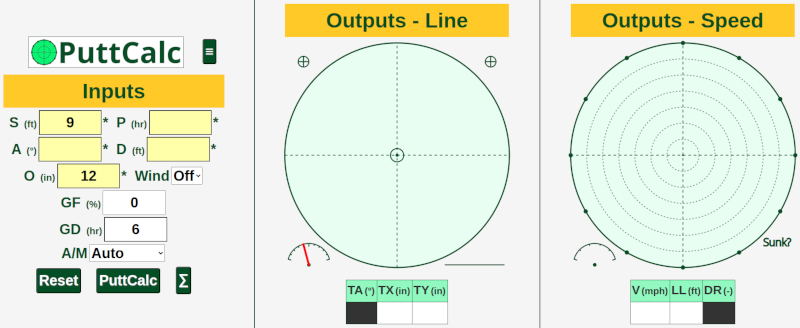
Below is a quick example:
Simulate and solve a 5-foot (D) putt, located at 2 o'clock (P) relative to the Fall Line, on a green with green speed (Stimp) of 11.5 (S), and a slope of 1° (A). Give the ball enough speed to roll 12-inches (O) past the far side of the hole (if the hole wasn't there). There's no grain (GF), nor wind. Find the optimum line and speed.
Enter the inputs given above, and click the PuttCalc button on the Dashboard (lower left side). Your results would look like this: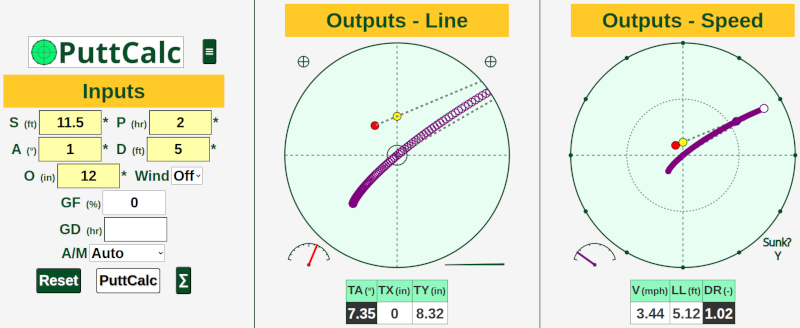
The left panel are the Inputs. The middle panel shows graphics and numbers related to the putt's line. The right panel shows graphics and numbers related to the putt's speed.
For the example putt shown above, you would aim at a Target Angle (TA) of a little over 7° to the right of the hole center, which is on a line passing through the Fall Line (i.e., the gravity line) at a little over 8" (TY) above the hole center. As for the speed of the putt, it's around 3 and a half (V) miles per hour, which on this speed of green would be equivalent to hitting a putt that travels a Level Length (LL) of a little over 5', which equals hitting the putt for a Distance Ratio (DR) of approximately 1.
The example putt uses the default settings. There are two user manuals available that provide more information about the Dashboard, about settings, and more. The book includes further explanations.
There's likely plenty of material on this site for golf content creators to provide even more information and examples on how to use PuttCalc.